
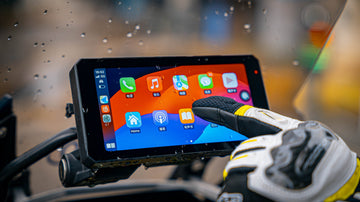
You can get a motorcycle smart riding system that works with both CarPlay and Android Auto today. Many brands, like the Chigee AIO-5 Lite, now let you use both Apple CarPlay and Android Auto. This depends on the hardware, like a bright screen, GPS, and Bluetooth. It also needs software that supports CarPlay and Android Auto. Some models, like the Aoocci BX and Eonon P6, have extra features. These include two cameras and waterproof designs. This makes them work better with your motorcycle.
Key Takeaways
- Many motorcycle smart riding systems work with Apple CarPlay and Android Auto. You can use maps, music, calls, and messages while you ride. These features help you stay safe on the road.
- Pick a system with a bright screen that works with gloves. It should have dual Bluetooth and built-in GPS. Make sure it is waterproof, like IP66 or IP67. This helps it work well in any weather.
- Try to get wireless CarPlay and Android Auto support. This lets you connect your phone without cables. Use voice assistants like Siri or Google Assistant for hands-free use.
- Check if your motorcycle and helmet work with the system before you buy. Follow the steps to install cameras, sensors, and displays the right way.
- Keep your system updated and use strong mounts and good cables. Watch tire pressure and safety alerts for a safer and smoother ride.
Dual Support Overview
CarPlay and Android Auto Basics
Many motorcycle smart riding systems let you use both Apple CarPlay and Android Auto. These systems help you connect your phone to your motorcycle’s screen. You can use maps, music, calls, and messages right on the display. Both CarPlay and Android Auto want you to stay safe and focused while riding.
Here is a simple table that compares Apple CarPlay and Android Auto for motorcycles:
| Feature | Apple CarPlay | Android Auto |
|---|---|---|
| User Interface | Has a grid with big icons. It is easy to use and simple. You cannot change much. | Uses cards to show more info. You can change the home screen. It shows more things at once. |
| Navigation | Uses Apple Maps. It has smooth moves, 3D buildings, and good lane help. It works well offline. | Uses Google Maps. It gives better traffic info and other routes. It also works with Waze for alerts. It needs more data. |
| Voice Assistant | Siri is good for quick commands. It works well with Apple devices. It may not work as well if it is loud. | Google Assistant understands more and can answer follow-up questions. It works better in noisy places and with different voices. |
| App Support & Ecosystem | Only some apps work, but it is safe. It is great for Apple Music and Messages. There are not many other apps yet. | More apps work with it. It works well with Google services. You can change more things and use more apps. |
| Customization | You cannot change much. The layout stays the same. | You can move cards and change how it looks. |
| Offline Usage | Works better without internet. It keeps your info private. | Needs more internet and collects more info. |
| Device Switching | Easy to switch between iPhones on screens like CarTablet Pro. | Also lets you switch between Android phones quickly. |
Apple CarPlay uses a grid with big icons. This helps you tap them even with gloves. Android Auto uses cards to show more info at once. You can change the home screen to fit what you like. Both work well on motorcycle screens like the MotorTablet Pro. You can use their features while you ride.
Tip: If you ride where there is no cell signal, Apple CarPlay is better for offline maps. Android Auto is best if you want live traffic and more apps.
Key Compatibility Factors
You need to check a few things to make sure your motorcycle system works with both Apple CarPlay and Android Auto. It depends on the hardware and the software.
Here are the main hardware things you need:
| Hardware Component | Minimum Specification |
|---|---|
| Display | 5-inch IPS Touch Screen |
| Cameras | Dual 1080P front and rear cameras |
| Bluetooth | Built-in Dual Bluetooth for smartphone and helmet/headset pairing |
| WiFi | Built-in WiFi |
| GPS | Built-in GPS with wired remote control |
| Storage Support | TF card support up to 128GB (Class 10 & U1 or above) |
| Power Supply | Input DC 12-24V, Output DC 5V/2.5A via USB-C |
| Waterproof Rating | IP66 |
| Connectivity | Wireless CarPlay and Android Auto via Bluetooth |
| Additional Features | G-Sensor, Tire Pressure Monitoring, Loop Recording, Dedicated App (Elook Pro) |
Pick a system with a bright screen you can use with gloves. Dual Bluetooth lets you connect your phone and helmet at the same time. WiFi and GPS help you with maps and updates. A waterproof rating like IP66 keeps your system safe from rain and dust.
Software is important too. Here are the main things you need:
- Wireless Apple CarPlay and Android Auto, so you do not need wires.
- Dual Bluetooth for your phone and helmet headset.
- Hands-free use with Siri or Google Assistant.
- GPS navigation from your phone.
- Touchscreen that works with gloves.
- DVR recording and waterproof build for safety.
Some systems, like the Chigee AIO-5 Lite, have all these features. They work with both Apple CarPlay and Android Auto. This is good if you use different phones or ride with friends who do.
Note: Always check if the system works with your phone and helmet. Not every system supports both CarPlay and Android Auto. Make sure before you buy.
Motorcycle Smart Riding System Compatibility
Hardware Requirements
When you pick a motorcycle smart riding system, check the hardware first. Good hardware helps CarPlay and Android Auto work well. You need a screen that is bright and clear. It should be easy to see in sunlight or rain. Most good systems have a 5-inch or bigger IPS touchscreen. This size makes it easy to see maps and music controls. A high resolution, like 1024 x 600, keeps things sharp. Brightness between 800 and 1000 nits helps you see the screen outside.
A strong waterproof rating is important for your device. Many systems, like Podofo and Zmecar, have an IP67 rating. This means water and dust cannot get inside, even in heavy rain. A zinc alloy shell makes the system tough and helps it last longer. Quick-release mounts with anti-vibration keep the screen steady on bumpy roads.
You also need Bluetooth and Wi-Fi built in. Bluetooth lets you connect your phone and helmet at the same time. Wi-Fi helps with updates and wireless CarPlay or Android Auto. GPS is important too. It helps you find your way and tracks your ride.
Cameras help keep you safe. Many systems, like Carpuride W712D Dash Cam and Weuaste 6.25" Dash Cam, have two HD cameras. These cameras record your ride and show a live rear view. Tire pressure sensors warn you if your tires are not safe. Some systems have blind spot alerts to help you avoid crashes.
Here is a table that lists common hardware features:
| Feature | Specification/Description |
|---|---|
| Screen Size | 5.0 to 6.25 inches IPS touchscreen |
| Resolution | 1024 x 600 or higher |
| Brightness | 800-1000 nits (sunlight-readable) |
| Waterproof Rating | IP67 (host), IP65 (wires) |
| Shell Material | Zinc alloy for strength and heat dissipation |
| Mounting | Quick-release, anti-vibration, 360° rotation |
| Bluetooth/Wi-Fi | Dual Bluetooth, built-in Wi-Fi |
| GPS | Built-in GPS module |
| Cameras | Dual HD or 2K cameras, loop recording, real-time streaming |
| Tire Pressure Monitor | Integrated sensors |
Tip: Make sure your helmet and motorcycle can fit the system. Some helmets do not work with intercom headsets or have small mounting spots.
Software Features
The software in your smart riding system matters a lot. You want it to work with both CarPlay and Android Auto. This lets you use your iPhone or Android for maps, music, calls, and texts. Wireless support means you do not need to plug in your phone every time.
Many systems, like Chigee AIO-5 Lite, work well with both platforms. You get good navigation, easy controls, and extra safety. The system connects to your phone with Bluetooth and Wi-Fi. This makes it easy to switch between CarPlay and Android Auto.
Some systems also work with HiCar for Huawei phones. The touchscreen works with gloves, so you do not need to take them off. Many systems have a special app. This app lets you see camera feeds, play videos, and get updates.
Here are some important software features to look for:
- Wireless Apple CarPlay and Android Auto support
- Voice control with Siri or Google Assistant
- Real-time GPS navigation from your phone
- Dual camera use with loop recording and emergency video lock
- Tire pressure alerts and blind spot warnings
- Streaming rear view for better safety
- App support for live view, playback, and updates
Here is a table that shows how camera and software features work together:
| Feature | Description |
|---|---|
| Dual Camera Loop Recording | Records front and back video for safety and proof |
| Real-time Rear-View Streaming | Shows live rear camera feed on the screen |
| Smartphone Integration | Works with Apple CarPlay (iOS 13+) and Android Auto (Android 11+) |
| Waterproof Design | IP67 rating keeps it safe in all weather |
| Tire Pressure Monitoring | Warns you if your tires are not safe |
| App Integration | Lets you view, download, and manage ride data |
Note: The Chigee AIO-5 Lite is easy to install, has a glove-friendly screen, and is strong. It works with both CarPlay and Android Auto, so it is a great choice for riders who want safety and options.
Setup and Connection
Checking System Compatibility
Before you start, you should check if your motorcycle system supports both apple carplay and android auto. Look at your motorcycle’s manual or the smart riding system’s guide. Some motorcycles come with built-in apple carplay or android auto. If your bike has this, you can use a wireless adapter to make the connection easier. For motorcycles without built-in support, you can use an all-in-one display that mounts on your handlebars. This display often supports both apple carplay and android auto, giving you seamless integration.
Follow these steps to check compatibility:
- Find out if your motorcycle has a built-in infotainment system that supports apple carplay or android auto.
- If not, look for aftermarket displays that offer dual support.
- Make sure the system works with your bike’s controls and audio.
- Check if you have the right installation kits and tools.
- Confirm that your phone’s operating system matches the requirements for carplay or android auto.
Tip: Always choose a system that fits your technical comfort level and offers easy integration.
Installation Steps
You can install a smart riding system by following these directions:
- Remove the valve caps and screw on the tire pressure sensors.
- Mount the front and rear cameras in safe spots using the brackets.
- Place the display unit on your handlebars so you can see it clearly.
- Attach the wireless remote control within easy reach.
- Connect all wires between the cameras, display, and power source.
- Hardwire the system to your motorcycle’s battery and accessory power.
- Secure all cables to keep them away from moving parts.
- Pair the Bluetooth remote with the display unit.
- Connect to Wi-Fi if you want to use the smartphone app for real-time preview.
A table can help you see the main steps:
| Step | Task |
|---|---|
| 1 | Install tire pressure sensors |
| 2 | Mount cameras |
| 3 | Attach display to handlebars |
| 4 | Fix remote control |
| 5 | Connect wiring |
| 6 | Hardwire to battery and ACC |
| 7 | Organize cables |
| 8 | Pair Bluetooth remote |
| 9 | Connect to Wi-Fi for app features |
Connecting Your Smartphone
You can connect your smartphone to the system using Bluetooth and Wi-Fi. Bluetooth lets you make calls and control music. Wi-Fi gives you faster data transfer and a better wireless carplay or android auto experience. Most systems let you switch between apple carplay and android auto easily. Wireless carplay and android auto help you use navigation, music, and calls without plugging in your phone.
If you have trouble connecting, try these steps:
- Check if your phone and system support the latest versions of carplay or android auto.
- Restart your phone and the system.
- Clear the cache on your phone’s carplay or android auto app.
- Make sure Bluetooth is on and paired.
- Avoid bumps that might disrupt the connection.
- Keep your devices cool to prevent overheating.
- Update your phone and system software.
- Ask for expert help if problems continue.
Note: Wireless carplay and android auto make riding safer by letting you use directions and music hands-free.
Limitations and Tips
Common Challenges
When you use a motorcycle smart riding system, you might have some problems. These problems can make CarPlay and Android Auto harder to use. Riders often talk about these issues:
- Your phone might not stay connected to the system.
- Calls may sound weird or hard to hear.
- Bluetooth headsets, like SENA, can lose their connection.
- Dirty USB ports or cheap cables can make connections bad.
- Bumpy roads can shake devices loose, so use mounts that stop shaking.
- Turning on your devices in the wrong order can cause problems.
- Sometimes, you need to update the system or get new parts.
- Some riders get upset and want to use a GPS instead.
- Using strong cases and mounts that stop shaking can help fix some problems.
Motorcycles are tough places for electronics. Rain, sun, and shaking can break systems not made for outside. You need weatherproof parts and a bright screen to keep things working.
Tip: Always make sure your system has a high IP rating and a strong mount. This helps protect it from rain and shaking.
Optimization Advice
You can make your smart riding system work better by following these tips:
- Update your system’s software to get new features and fix bugs.
- Use good cables and keep USB ports clean for better connections.
- Pick a screen that is bright and easy to see in sunlight.
- Use a mount that stops shaking to keep your device safe.
- Check your system and update it often so sensors work right.
- Set up hands-free controls to help you focus on riding.
- Use the app for GPS, planning routes, and checking how your system works.
- Change control settings for city or highway rides.
- Look at tire pressure and safety alerts before you ride.
Updating your system keeps it safe and up to date. You will get new features, better maps, and more safety alerts. These tips help you ride safely and get the most from your smart riding system.
You can use both CarPlay and Android Auto on your motorcycle if you have the right smart riding system. Some devices, like the Aoocci BX and INNOVV N2, let you use both without wires. It is important to check if your system works with your phone and helmet. Pick features that help keep you safe, like voice control you do not need to touch, screens you can use with gloves, and a waterproof case.
| Safety Feature | Benefit |
|---|---|
| Hands-free operation | Lets you use voice commands safely |
| Glove-friendly touchscreen | Keeps your gloves on while riding |
| Waterproof design | Protects your device in any weather |
Make sure to update your system often and get your apps ready before you ride. This will help you stay safe and enjoy your ride every time.
FAQ
Can I use both CarPlay and Android Auto on the same motorcycle system?
Yes, you can use both if your smart riding system supports dual platforms. You just need to connect your iPhone for CarPlay or your Android phone for Android Auto. Switch between them by pairing the device you want to use.
Do I need to plug in my phone every time?
No, many modern systems support wireless CarPlay and Android Auto. You can connect your phone using Bluetooth and Wi-Fi. This lets you keep your phone in your pocket or bag while you ride.
Will my system work in the rain?
Most smart riding systems have a waterproof rating like IP67. This means you can use your system in heavy rain. Always check the waterproof rating before you buy.
Can I use voice commands while riding?
Yes, you can use Siri or Google Assistant for hands-free control. Just press the voice button on your system or remote. This helps you stay focused on the road.
What should I do if my phone does not connect?
Try these steps:
- Restart your phone and system.
- Check Bluetooth and Wi-Fi settings.
- Update your apps and system software.
- Use a good-quality cable if you connect by USB.


